
New updates in TrainingPeaks
Latest & Greatest
Updates that keep on rolling
The newest improvements, upgrades, and features to help supercharge training and streamline coaching.
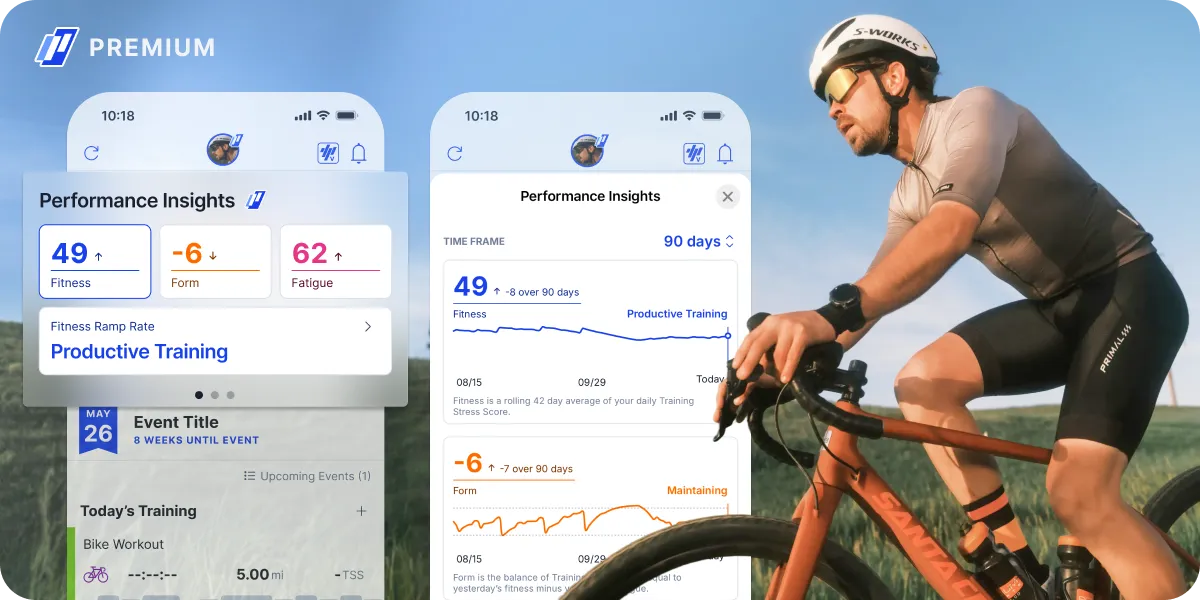
See the big picture of your progress
Athlete Home is your daily hub and turns complex health and training data into a clear roadmap. Stop guessing and start executing with a personalized dashboard designed for your specific goals.

Fully customizable
Move each section of Athlete Home to customize for what you’re chasing whether that is an event, recovery or subjective feedback.

What to do today, and how you’re trending
Execute training from your coach or plan, see how your training is trending or understand the full context of your health and training over time.

ŌURA | TrainingPeaks:
life and training now in sync
Your Oura data, now in TrainingPeaks, giving you a full-circle view of your training and life. See your sleep, HRV and stress scores automatically populate Health Insights.
Deeper analysis, less manual work
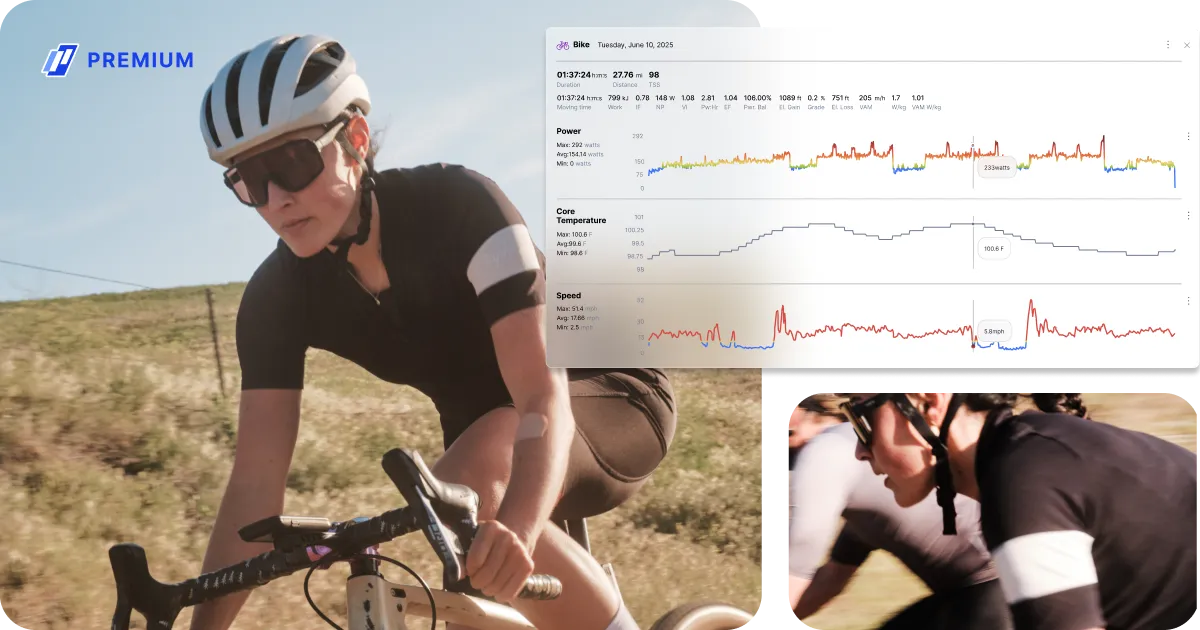
Analyze 360 transforms raw data into actionable insights by eliminating the guesswork and manual digging. Here is how it brings your entire performance story into a single, cohesive view.

Automated intelligence
Forget manual tracking. Interval Detection uses advanced data science to instantly surface key work segments from rides and runs. Climb Detection automatically isolates significant ascents across all sport types using GPS and elevation data.

Surgical precision & customization
The Lap Comparison tool allows you to overlay key intervals side-by-side to pinpoint exactly where performance breaks down or excels.

Every metric + custom overlays
Any metric recorded by a device, from Core Body Temp to Torque, is now visible in separate, stacked charts. Plus the ability to create custom overlays with the exact metrics you need to see.
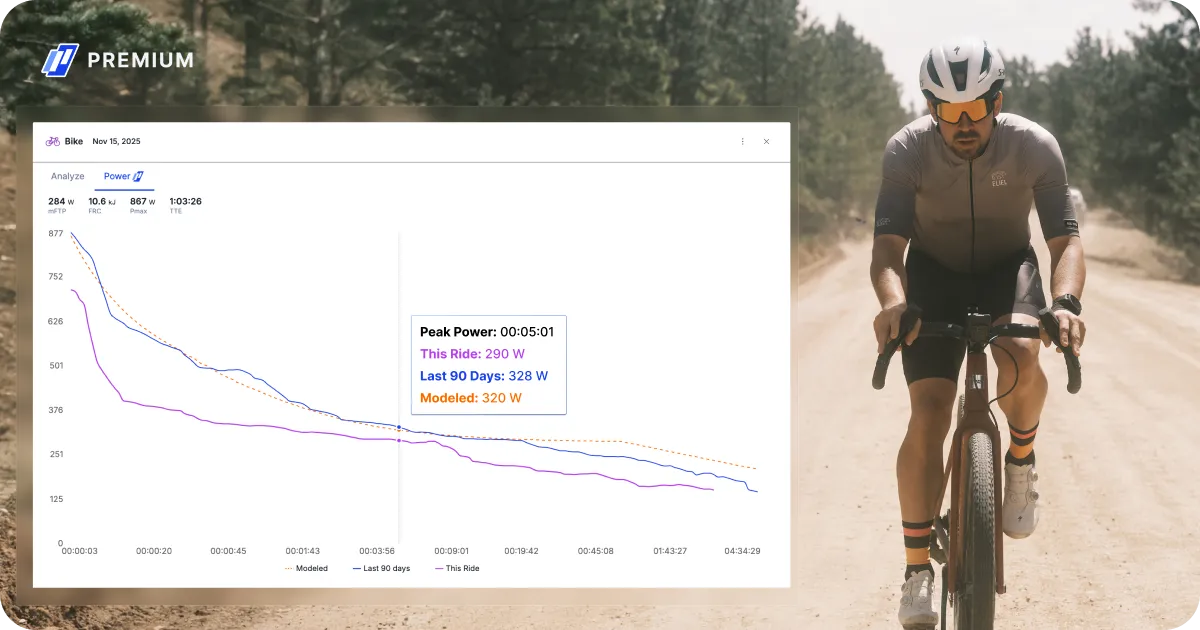
Map strengths, find weaknesses, dial in intervals
Modeled Power reveals your Power Duration Curve at a glance, surfacing key metrics like mFTP, FRC, and Pmax to help you pinpoint strengths and expose weaknesses before race day.
Anaerobic Battery (dFRC) tracks how hard each effort is in real time, so you can perfect interval rest periods and know exactly when, and why, an athlete blows up.
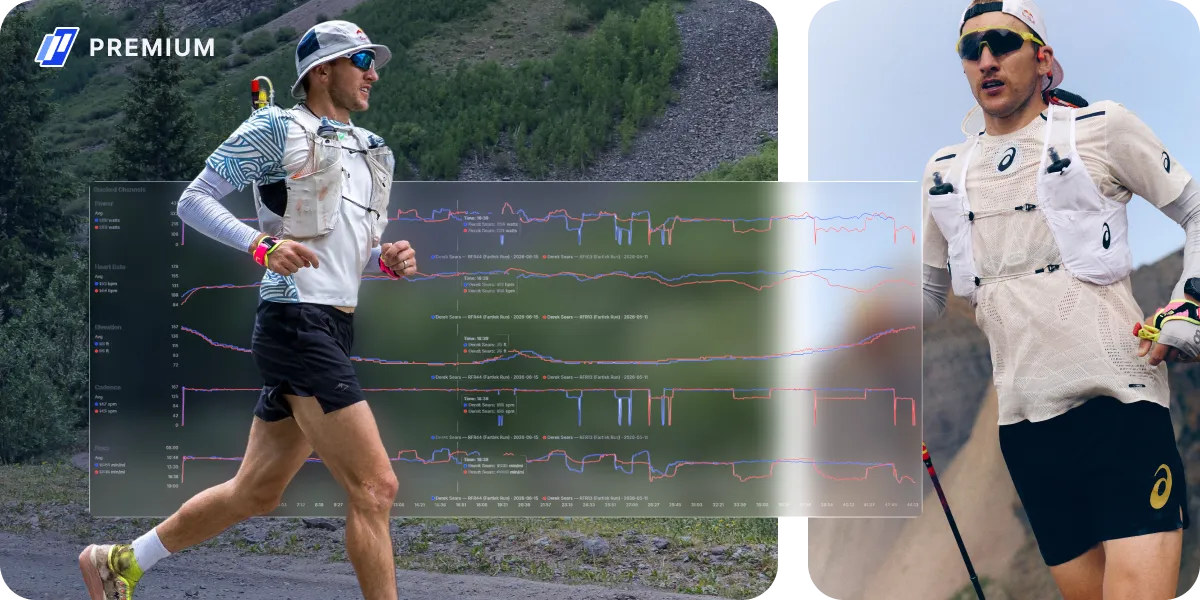
Compare workouts, spot progress
Stop digging through individual files to see if your athlete is actually improving. You can now compare multiple workouts side-by-side in one centralized view.

Compare similar workouts over time
In the Dashboard Tab, go to Workout Comparison to select the workouts you’d like to compare. See an athlete’s performance in the workout metrics, including deltas to easily spot progress.

Smart filtering
Use the filters to search for workouts by name, duration, athlete, and more.

Compare multiple athletes
Compare multiple athletes in one view, to see how a team or group stack up to each other.
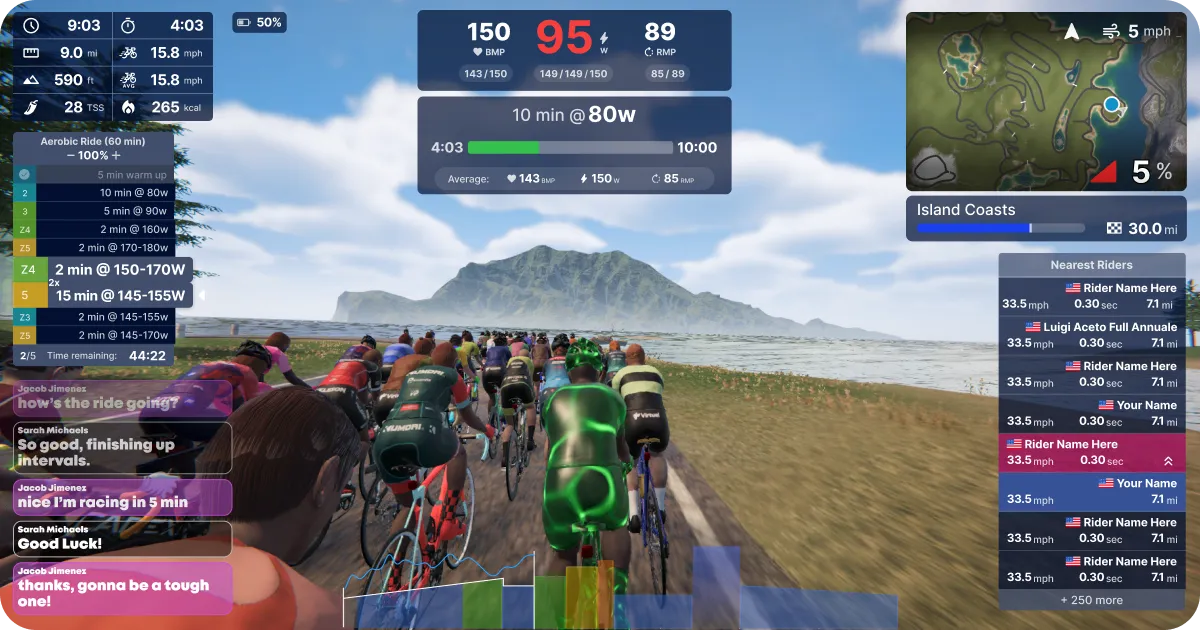
Virtual just got a visual upgrade
The entire world has leveled up visually, with more to explore. Check out a new heads up display, new avatars, new animations, new lighting, sky and water. Virtual is more beautiful than ever!

Ride anywhere with GPXplore
Don’t leave your upcoming events to chance. With GPXplore you can ride any route you want, any time you want, anywhere in the world. Load your course, teleport to key sections, and recon every corner on realistic terrain.

New areas to explore
Explore Velocity Vineyards, wind through fall foliage in Watts Wharf or ride under the lights of the Forest Velodrome.

Virtual rides, no keyboard required
Use your phone to easily chat with teammates and explore upcoming events during a TrainingPeaks Virtual ride. Download TP Hub.
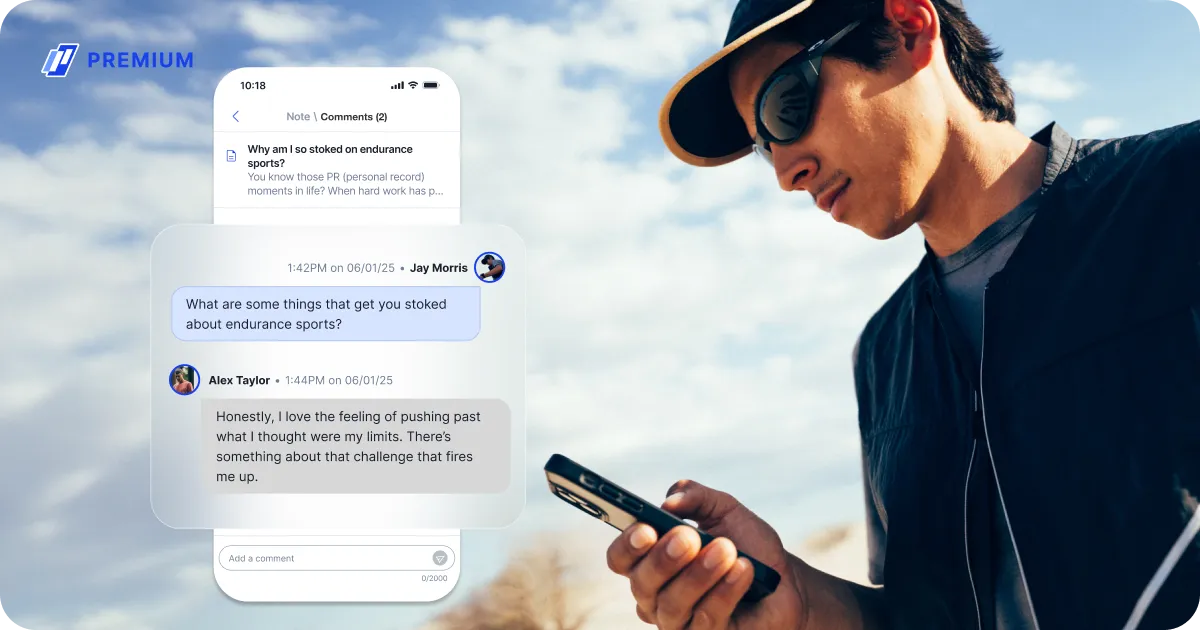
All your communication, all in one place
With Messaging coaches and Premium athletes can chat, connect, send photos, videos and documents and more – all without leaving TrainingPeaks.

Older Updates

Go Beyond a Single Sport with Sport Subtypes
From gravel racers to scullers, Sports Subtypes track all your workouts across multiple sports, even the obscure ones, now shown at a glance in the calendar view.

The Language of Training is Universal
TrainingPeaks now speaks more languages than ever, including German, Portuguese, and multiple localized versions of Spanish. Newly updated and improved, thanks to your comments!

Streamlined Payments for Seamless Coaching
Coaches can simplify the payment process by sending invoices, setting terms (monthly, annually, or every 4 weeks), and collecting payments—right in TrainingPeaks.

Health Data Meets Training Data
At this point, fitness devices can shed more light on your health when you aren’t working out than when you are. Health Insights brings all that data into TrainingPeaks so you can keep track of everything in one place.

Never Bonk Again with Fueling Insights
Partnering with renowned physiologist Dr. Iñigo San-Millán, Fueling Insights utilizes data from over 250 lab-tested athletes in a sophisticated workout tool for cyclists that calculates fat and carbohydrate calories burned using power meter data.

Training That Syncs to Your Cycle
Your cycle isn’t an afterthought in day-to-day life. Garmin Women’s Health data in TrainingPeaks makes sure it’s not an afterthought in your training. Sync Women’s Health data from Garmin devices directly in TrainingPeaks and align your training with your cycle.
Integration Updates

The power of TrainingPeaks, now on your Apple Watch.
DECEMBER 2023 | MOBILE + WEB
One of our most highly-requested device integrations is now available! Your bike and run workouts can now be automatically sent to the Apple Watch workout app, giving you one more way to get training guidance right on your wrist.
Your Apple Health workout data will continue to automatically sync back to TrainingPeaks, giving you a complete and seamless training experience, all with your Apple Watch.

Garmin Users: Don’t Miss a Beat, See Resting Heart Rate in TrainingPeaks
OCTOBER 2023 | MOBILE + WEB
Your resting heart rate (RHR) now syncs from Garmin to TrainingPeaks, so you can track all your metrics in one place. Monitoring your RHR can provide insight into your recovery, hydration, and can even indicate if you’re at risk of illness. With the addition of Resting Heart Rate, you get a detailed picture of your health and progress, so you can make informed decisions with your training.
To see your RHR, first make sure you’re using the latest version of the mobile app. Then go to your settings from web or mobile, navigate to “metrics,” and make sure that “Resting Heart Rate” is in the “In Use” column. For more information on syncing Garmin metrics with TrainingPeaks, visit our Help Center.

Bring Your Swim Workouts to Life with FORM Goggles
July 2023 | MOBILE + WEB
The power of mid-swim data is now in your hands. Sync workouts to your FORM Goggles, and bring more accuracy (and fun!) to your swimming.
Swim workouts from any TrainingPeaks format (even text descriptions) now sync as structured workouts to your FORM Goggles. Speed, distance, and interval prompts will appear in realtime as you swim, with stroke type and turns tracked as well. See everything you need to stay focused and feel more confident in your swim workouts.

Garmin Users: HRV Is Now in TrainingPeaks!
JUNE 2023 | MOBILE + WEB
Garmin Users: Your HRV data now syncs automatically, along with your daily health metrics. Never spend another second manually entering your HRV data. You — and your coach — will now have instant access to this data, giving you a more complete picture of your health and fitness.
Coaches: You now have seamless access to HRV data for your athletes — Basic and Premium — who use a Garmin device to train. To better analyze an athlete’s HRV over time, upgrade an athlete to Premium to view HRV charts.
See if your Garmin device tracks HRV.
To learn more about how to sync Garmin Connect with TrainingPeaks, visit our Help Center.

Upgrade to Premium

Train With Confidence

Achieve Your Goals
Training Updates
Strength Workout Builder
JULY 2024 | MOBILE + WEB
The new Strength Workout Builder is here to help coaches and athletes with off-season conditioning, prehab, rehab for unexpected injuries, and increased mobility to fully empower your training. Accurately and efficiently track your progress with completely overhauled, strength-focused exercises that include more than a thousand brand-new video tutorials.

Hit Your Goals!
JANUARY 2024 | WEB
(Re)Introducing compliance colors for Goals. You can add goals to the calendar the same way you add any workout: just create a new workout and look for “goal” in the bottom of the menu. You can add anything to the checklist, and see compliance colors for what you (or your athletes) complete. This update also includes changes to the look of calendar workouts.
*Goals will appear on mobile and web but compliance colors are currently only available in the web app.

The Workout Summary Just Got A Facelift
JULY 2023 | MOBILE
Enjoy a smoother post-workout experience with a more modern workout summary.
Love that extra rush from seeing all those green workouts? We’ve got great news – the compliance color bar now reveals exactly how well you stuck to your planned workout. Get clearer insights, and keep turning your workouts green.
Head to any previous workout to see the new lay of the land.
This update currently applies to iOS users only, with updates for Android coming soon.